Going somewhere alone? Set a check-in before you go.
Choose someone you trust and set a time. If you miss your check-in, LoneBuddy can alert your Buddy by SMS.
No account or sign-up required. No app needed for your Buddy. No constant GPS tracking.
No mobile data needed to send SMS alerts — mobile/SMS signal is required.

Three simple steps before you go.
Choose your Buddy
Pick someone you trust to receive your safety alert. Your Buddy does not need to install LoneBuddy.
Set a check-in
Choose when you expect to be safe or finished.
Miss it? They're alerted
If you don't check in as planned, LoneBuddy can send your chosen Buddy an SMS alert.
Useful safety without constant surveillance.
No app needed for your Buddy
Buddy alerts are sent as ordinary SMS messages.
No constant GPS tracking
Location is used when relevant safety features need it rather than continuously following you.
Works without mobile data
Core safety functions are designed to work without internet access. Sending SMS alerts still requires mobile/SMS signal.
Privacy-first
Contacts, profile information and safety logs are kept on your device rather than a LoneBuddy cloud database.
One check-in. Lots of reasons to use it.
🚗 Driving alone
Set a check-in before a long journey so someone knows if you don't arrive as planned.
🌙 Walking home
Set a timer before the walk and check in when you're safely home.
🧑💼 Working alone
Use LoneBuddy for your own personal safety when you're working by yourself.
🏍️ Motorcycling
Start a check-in before a ride so your Buddy can be alerted if you don't check in afterwards.
🥾 Hiking & travel
Give someone a simple timed safety back-up when you're out exploring alone.
💬 Dates & nights out
Set a check-in before meeting someone or heading out and let a trusted person be your Buddy.
LoneBuddy is for individual personal safety. It is not an employer monitoring, workforce-management or lone-worker compliance system.
Personal safety, without giving up control.
No account required
No account. No sign-up. Just get started — LoneBuddy does not require you to create an account to use the app.
Privacy-first
No constant GPS tracking.
SMS Buddy alerts
Your Buddy can receive an alert without installing LoneBuddy.
Active alerts stay active
A subscription change does not interrupt a safety alert or session that is already active.
Clear limits
LoneBuddy does not contact emergency services directly. In the UK call 999 or 112 when urgent help is needed; elsewhere use the emergency number for your location.
Simple when you need it.
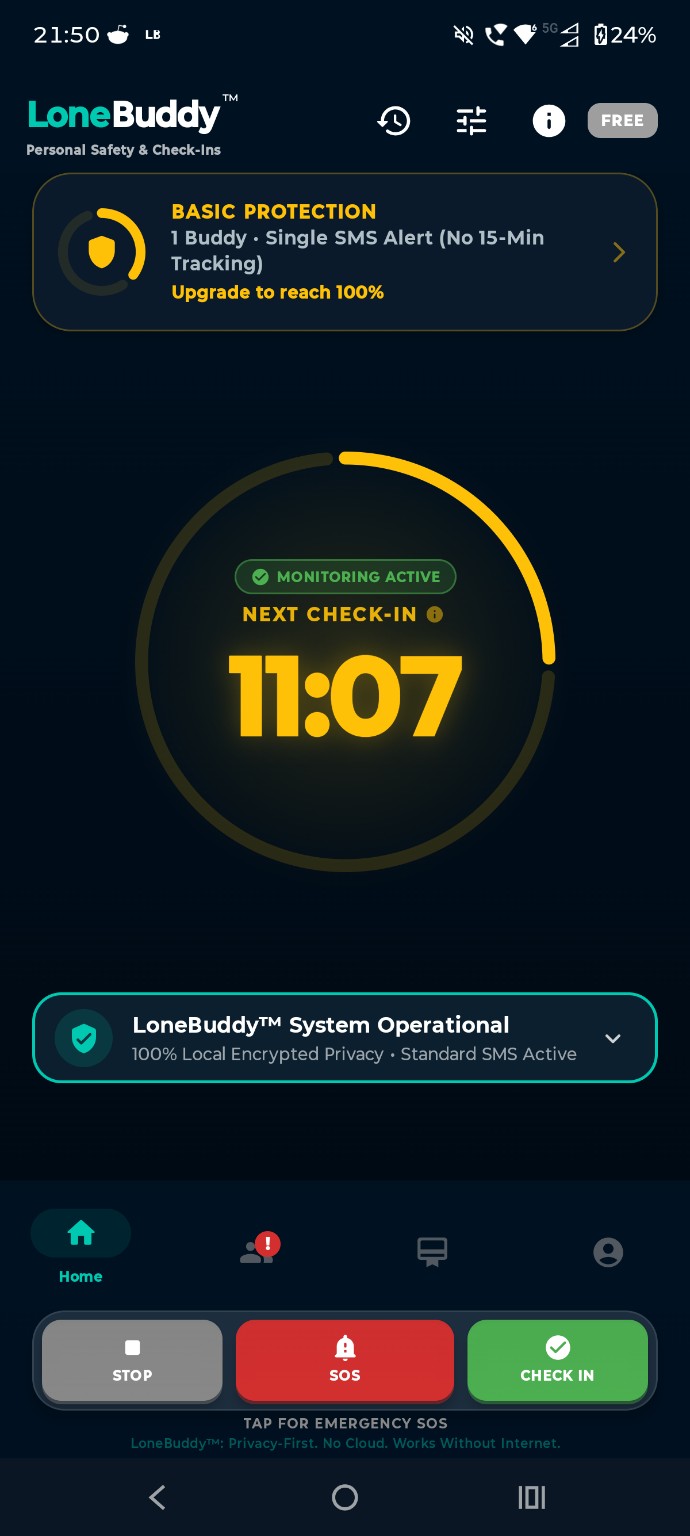
See your active check-in at a glance, check in when you're safe, or use SOS when you need to alert your chosen Buddy.
Actual LoneBuddy Android interface. Features shown may vary by plan and active safety state.
Frequently asked questions.
Does my Buddy need the LoneBuddy app?
No. LoneBuddy sends Buddy alerts by standard SMS, so your chosen Buddy does not need to install the app.
Does LoneBuddy work without internet or mobile data?
Core functions are designed to work without an internet connection. SMS/mobile signal is required to send and receive Buddy alerts.
Does SOS contact emergency services?
No. LoneBuddy is a supplementary personal-safety tool and does not contact emergency services directly. In the UK call 999 or 112 when urgent help is needed; elsewhere use the emergency number for your location.
When does LoneBuddy use my location?
LoneBuddy does not use constant GPS tracking. Location is used when relevant safety features need it, including SOS and supported active-alert features.
What happens if I have no mobile signal?
An SMS alert cannot be delivered without suitable mobile/SMS signal. Network conditions, device settings and other factors can also delay or prevent delivery.
Is there a free version?
Yes. Free includes 1 Buddy, a 30-minute check-in, missed check-in alert, SOS with location, low-battery alerts, safety logs and the General Use profile. Premium adds more Buddies, profiles, longer custom check-ins and additional tools.
Going somewhere alone?
Set your check-in before you go. Start free on Android.
Android · Free version available · Optional 7-day Premium trial · No account or sign-up required · Your Buddy doesn't need the app · SMS/mobile signal required for alerts
LoneBuddy is a supplementary safety tool, not an emergency service or guarantee of safety, response or message delivery. SMS, network, roaming and other third-party charges may apply and are the user's responsibility. Alerts can fail or be delayed because of signal, networks, device settings, battery, incorrect details or other factors. Users remain responsible for using the app correctly and for contacting emergency services directly when needed. See our Terms & Conditions for full limitations and mandatory legal protections.